Add or remove contacts from Blacklists by selecting the Blacklist tab located on the right side of the contacts tab from the contacts main section.
The Blacklist contains contacts who have either Unsubscribed or Opted-Out from messaging services and will not receive messages from the service that they opted out or unsubscribed from.
From the Blacklists dropdown box,
Select the sending entity that will blacklist the subscriber.
Select Add to Blacklist located at the top-right corner.
Selecting it will allow you to perform the adding contacts to the blacklist, requiring confirmation of a dialog box that ensures the conditions of contacts consent have been met. Read the terms carefully as they are important, and ensure that you are in compliance with all of them.
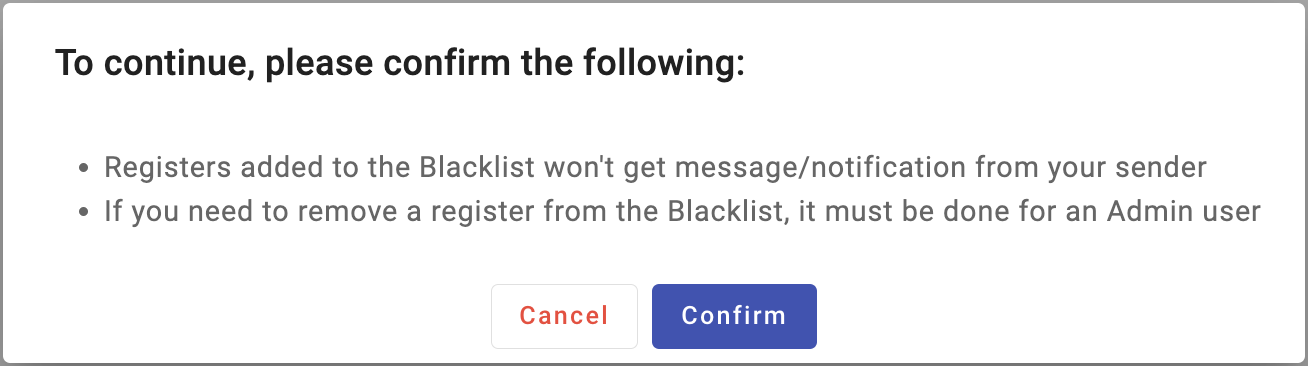
ON THE CONSENT DIALOG BOX: If the Consent Dialog is not confirmed, you will not be able to add contacts to the blacklist, since it is an essential part of the Terms of Service.
Once the Consent Dialog has been confirmed, the following options to add contacts to the blacklist will be available:

Upload CSV file (Multiple contacts)
Add a single Subscriber (Single contacts)
Refer to our https://docs.messangi.com/ for detailed instructions on how to add or remove contacts from the blacklist.